

Member Administration Portal Guidance:
Mid-Year HSA Changes
Log in to the Member Administration Portal at https://sehp.member.hrissuite.com. Following the below steps to elect changes to your HSA contributions.
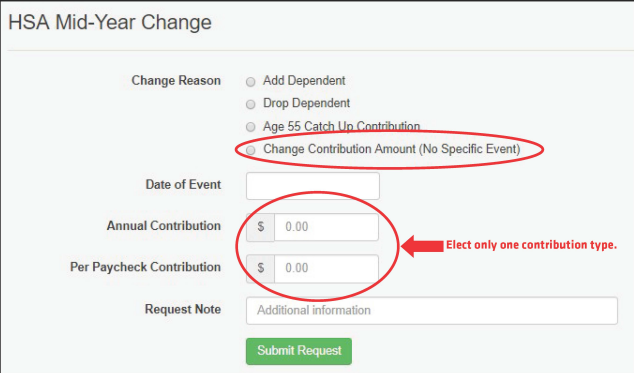
Note : For simplest processing, complete either the Annual Contribution or Per Paycheck Contribution field.
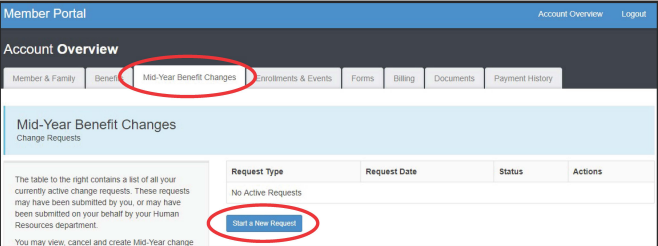
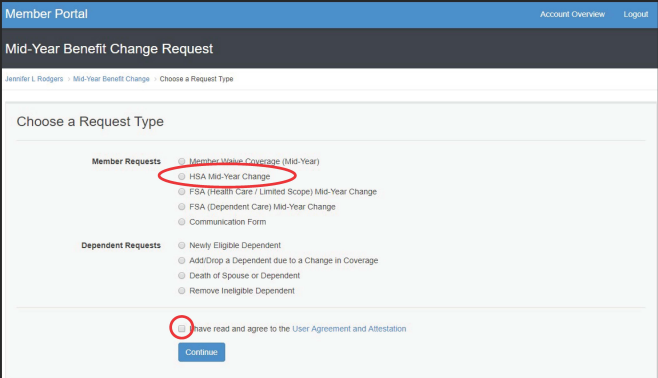
Unless the change request is due to a catch-up contribution, or a dependent is being added to or removed from coverage at the same time as the HSA change request, select "Change Contribution Amount (No Specific Event)". Enter the date of the request as the date of the event.
Note : For simplest processing, elect either the Annual Contribution field or the Per Paycheck Contribution field and enter 0.00 in the other field. Enter a request note describing the change you wish to make.
Note : Election changes to HSA contributions will be effective the next full payroll cycle, meaning that it is normal to see a 2-4 week delay before seeing changes reflected in pay checks, depending on when in a pay-roll cycle the change request is made.