Member Administration Portal Guidance:
Updating Contact Information
Purpose:
This document contains instructions for a member to update contact information in
MAP.
Instructions:
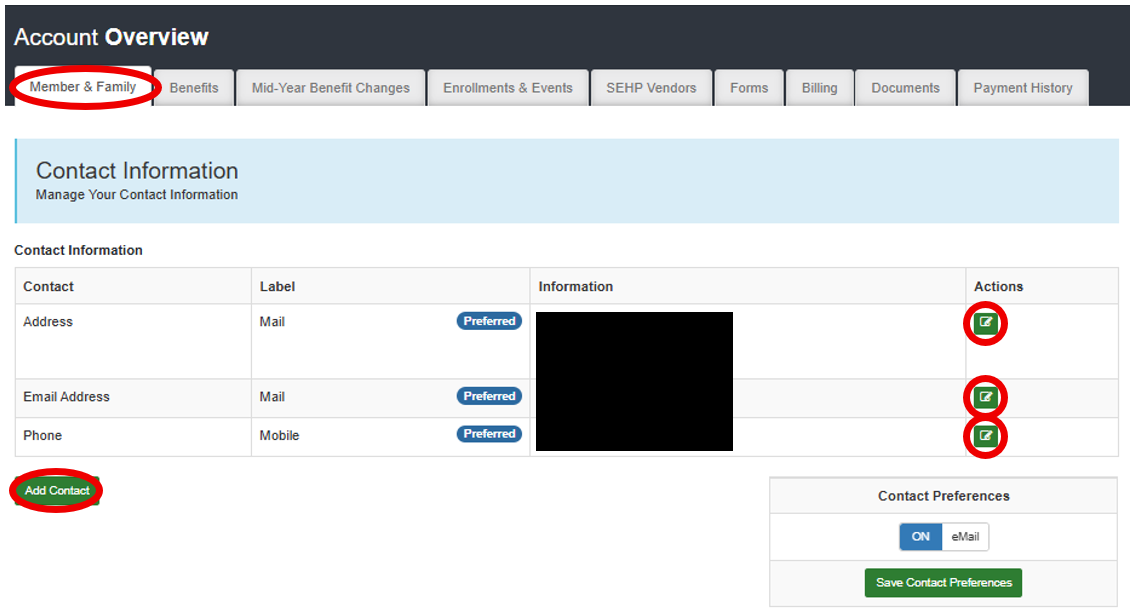
Log in to the MAP portal at https: //sehp.member.hrissuite.com/. Navigate to the Member & Family tab, then scroll down to the Contact Information
section. If any information is outdated or inaccurate, select the edit button to the
right of the contact type. Upon saving, the changes made will overwrite the original.
If an alternate contact is desired, such as a summer residence or personal email address,
use the Add Contact button to create a new contact line, While multiple contacts of
each type can be included, only the one marked Preferred will be used for correspondence.