

Member Administration Portal Guidance:
Adding a Newly Eligible Dependent
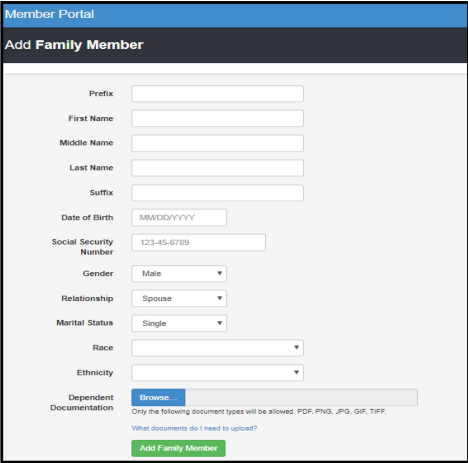
Log in to the MAP Portal at https://sehp.member.hrissuite.com/. Navigate to the Member & Family tab, and click, "Add Family Member".

Complete the required fields for each dependent. For each dependent who has not previously been reported, documentation of dependent status must be uploaded. The preferred file format is PDF. If you are unable to scan or download a PDF, you can instead upload a high-quality, high-resolution photo of the documentation and upload the image as a JPG or PNG file. If using either of these file types, please confirm that all four corners of each page are visible and that the document can be easily read before submission. Illegible or low-resolution photos may not be accepted by the plan administrators.
NOTE : If the SSN of a newborn is not available, a temporary placeholder of 777-77-7777 may be used for enrollment. This must be updated with a valid SSN within 41 days of birth to prevent loss of coverage.
NOTE : Adding a dependent to the portal does not enroll the dependent in coverage. Please add all dependent information, then continue to page two and complete steps to request coverage.
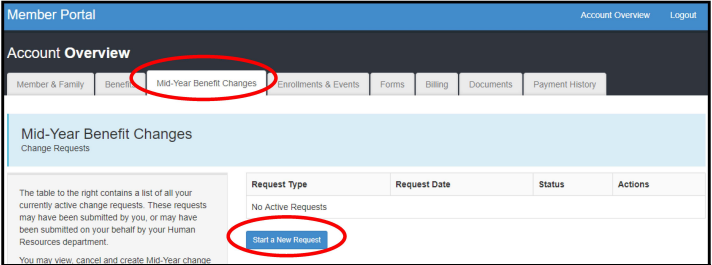
Navigate to the Mid-Year Benefit Changes tab and follow the menu prompts to request a mid-year addition of a newly eligible dependent. The request will be processed in 1-2 business days. It is the member's responsibility to check back on their request and make sure that the accompanying documentation has been accepted by plan administrators. When adding a dependent mid-year, the member will have the option to elect to add the dependent to any currently elected coverage. The elected plan cannot be changed, and previously waived dental and vision benefits cannot be elected at this time. Such changes may only occur during annual open enrollment.
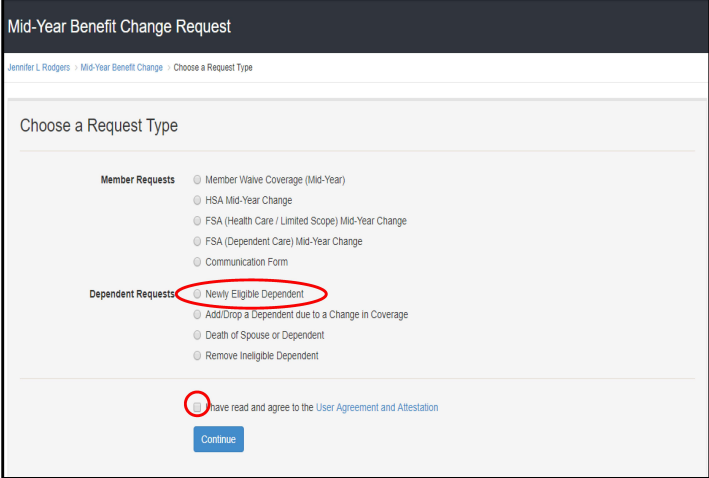
Select the type of dependent you are adding, and enter the date of event leading to their eligibility (e.g., date of birth to add a newborn, date of marriage to add a spouse). Any dependents added to the portal who are not currently on benefits are listed. Select the dependent(s) and coverage choices you wish to add, then submit the request.
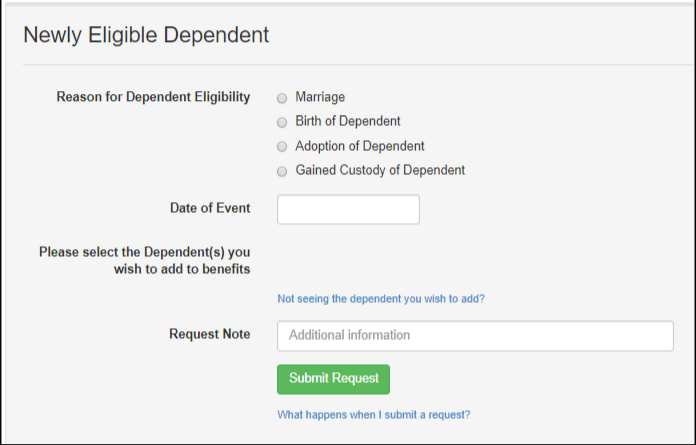
The member will receive an email in 1-2 business days to confirm that the selected dependents have been added to SEHP coverage. In most cases, the effective date for a newly eligible dependent will be the first of the month following the qualifying event. Newborn coverage is effective retroactive to the date of birth.