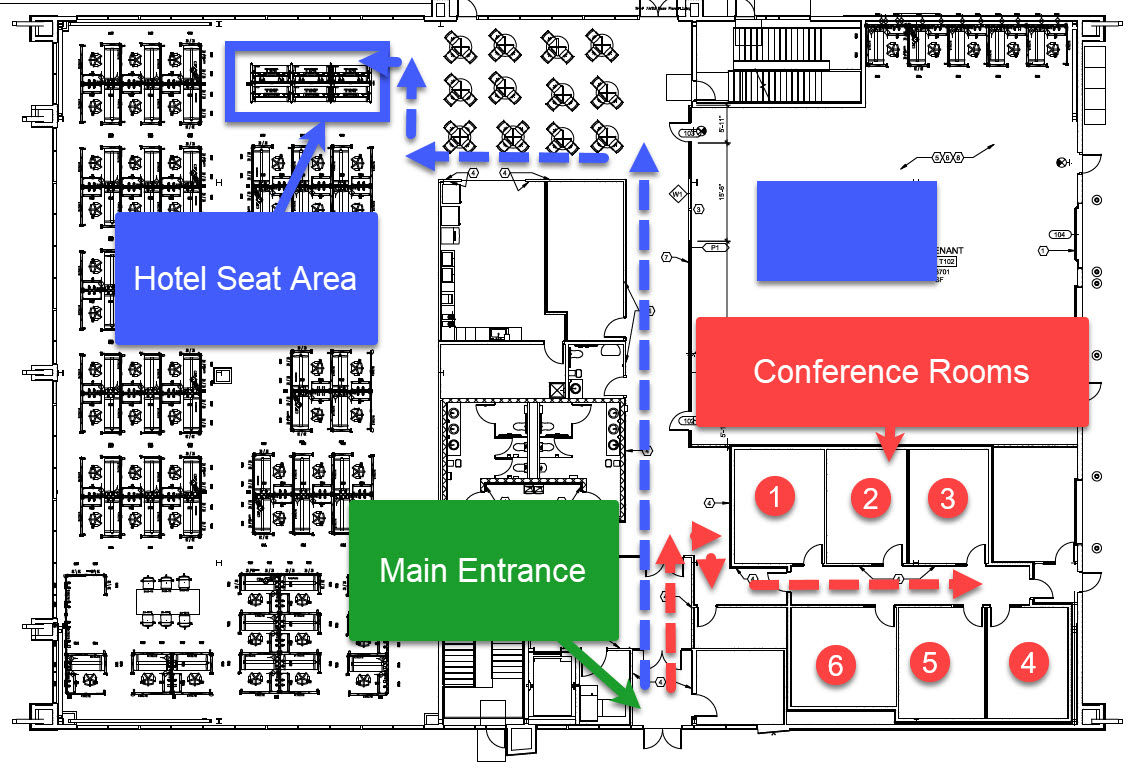
To schedule a conference room or hotel seat, select a "room" or "hotel seat" button below.
Steps to follow:
- Select a room / hotel seat
- Pick a duration
- Find time Slot ( If no time slot available, that room is booked at that time and duration, you can select a different room)
- Fill out your information
- Look for email confirmation and add to your calender if needed.
- Hotel Seating is open seating and you are free to sit anywhere in the area outlined on the map below.
- Guest WiFi is provided.
- You will receive a confirmation email that will allow you to add the appointment to your calender system.
Pick an option below
- Conf. Room 1
TV | OWL Camera | WhiteBoard | Seats 6
- Conf. Room 2
TV | OWL Camera | WhiteBoard | Seats 6
- Conf. Room 3
TV | WhiteBoard | Seats 6
- Conf. Room 4
TV | WhiteBoard | Seats 6
- Conf. Room 5
TV | WhiteBoard | Seats 6
- Conf. Room 6
TV | WhiteBoard | Seats 6
- Hotel Seat
6 Seats Available
Map of Building